09-06 - Variables
Go and work
Honor the One who is working on you.
Do so by making beautiful things,
Be serving in beautiful ways,
By speaking up for the weak whose beauty is being maligned,
By filling this city with the aroma of good and beautiful workReflect the beautiful work of your heavenly Father,
Nourished now by the grace and mercy of Christ,
In the power of the Holy Spirit.God has already accomplished the great work.
God goes before you and behind you.
God works at your side.(Matthew Kaemingk & Cory B. Willson, Work and Worship, p. 140)
Retrieval
- What are programs? What are computations? What are algorithms?
- What is code?
- What is a programming language?
- Why it can be hard to use a programming language?
Objects and Variables
Object
- Python syntax specifies some ways to represent different types of data. A data representation in Python is called an “object”.
| Type | Object type in Python | Example |
|---|---|---|
| Integer number | int |
123 |
| Decimal number (floating point) | float |
3.14 |
| Logic value | bool |
True, False |
| Text | string |
"Hello World!" |
Variables
- Variables are names we set to refer to objects.
- A not-so-good metaphor: variables are containers for objects
- A better metaphor: objects are houses, variables are addresses of these houses
Objects x variables
- It is very important to differentiate!
- Which of the following are variables and which are objects?
"hello"

hello

132

var_1

truev

True
Variable naming conventions in Python
- They MUST start with a letter or with _ (underline)
- They are case sensitive (‘C’ is different from ‘c’)
- They can’t contain:
{ ( + - * / \ ; . , ? - They can’t have names of words already reserved for other purposes in Python:
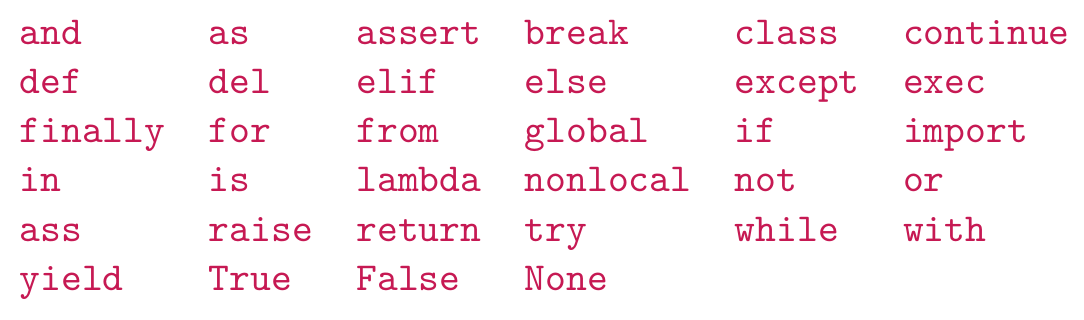
- What happens if?
Assignments
When Python sees the operator = it does the following:
Evaluates the right-hand side (rhs)
The right of the assignment operator can be:
Objects:
age = 21Variables:
my_cost = your_costExpressions:
x = (x + 1) * y
Assigns the resulting object to the variable on the left-hand side (lhs)
Only a single variable is allowed on the left side!
For example,
x + 1 = 2is WRONG SYNTAX!
Compound assignment operators
- Python and other languages make available a shortcut for performing operations in variables and updating them.
- For example,
is the same as:
You can use compound assignment with all operators!
Example: what will this expression do?
Converting basic objects
1. Converting to Integer
- From Float:
int(3.14)results in3 - From String:
int("42")results in42 - Invalid Conversion:
int("hello")raises aValueError
2. Converting to Float
- From Integer:
float(7)results in7.0 - From String:
float("3.14")results in3.14 - Invalid Conversion:
float("abc")raises aValueError
3. Converting to String
- From Integer:
str(123)results in"123" - From Float:
str(9.99)results in"9.99"
Example Code
# Convert float to integer
num = int(5.7)  # 5

# Convert integer to string
text = str(123)  # "123"

# Convert string to float
pi = float("3.14159")  # 3.14159